
To start off, we’ll talk about the page title, meta description & the heading. The following screenshot shows where they exist when an end user visits them.

The page heading
The heading is basically the page heading that the end user sees. To set the heading:
- Go to Gutenberg
- Set the top heading here – this acts as the page heading.

The title
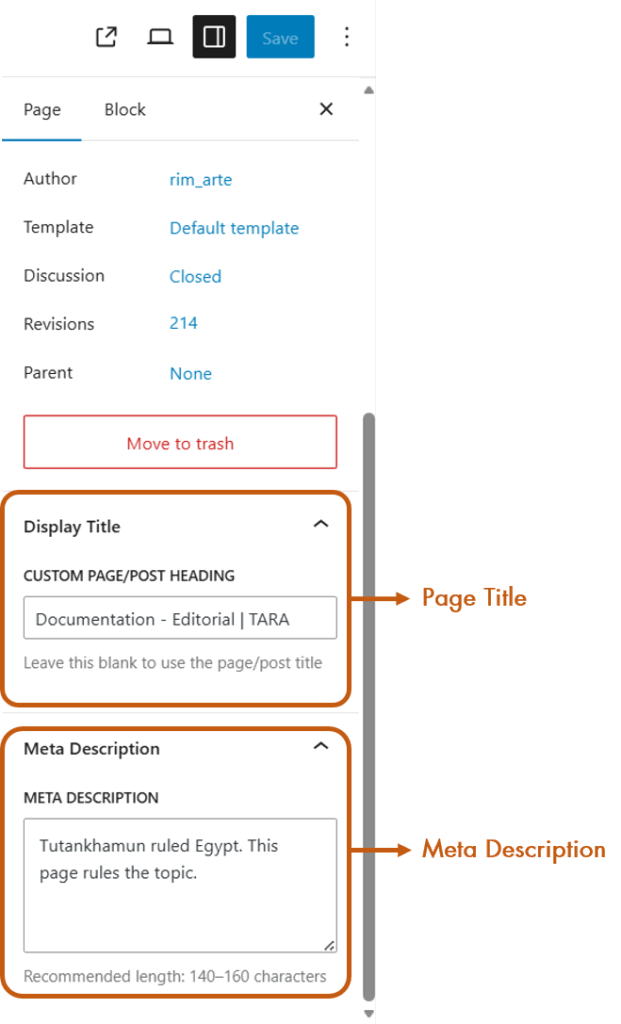
The title is what you’ll see on: the search results, the browser tab and the bookmarks. To set the title:
- Go to Gutenberg
- Page Settings (check for this icon:
 on the top-right of the screen)
- Go to the
Pagetab - Scroll down to
Display Title - Enter the page title.
The meta description
The meta description is for the search engine.
- Go to Gutenberg
- Page Settings (check for this icon: on the top-right of the screen)
- Go to the
Pagetab - Scroll down to
Meta Description - Enter the page title.
These things are essential to help the search engines rank your website better. So always remember to add these details to your page. Happy editing!